Objects
Eophis abstractions are presented here. The aim is to explain their roles and functionalities but not to demonstrate how to use them. See Usage section with coding examples for this.
Coupling
Tunnel
The Tunnel represents the gate towards a coupled geoscientific model.
- It gathers information on:
global and local grids on which coupled fields are discretized.
exchanges themselves, as communication frequencies, corresponding in/out fields names and associated grids.
OASIS objects and commands to execute the sending and reception of fields are encapsulated in the Tunnel.
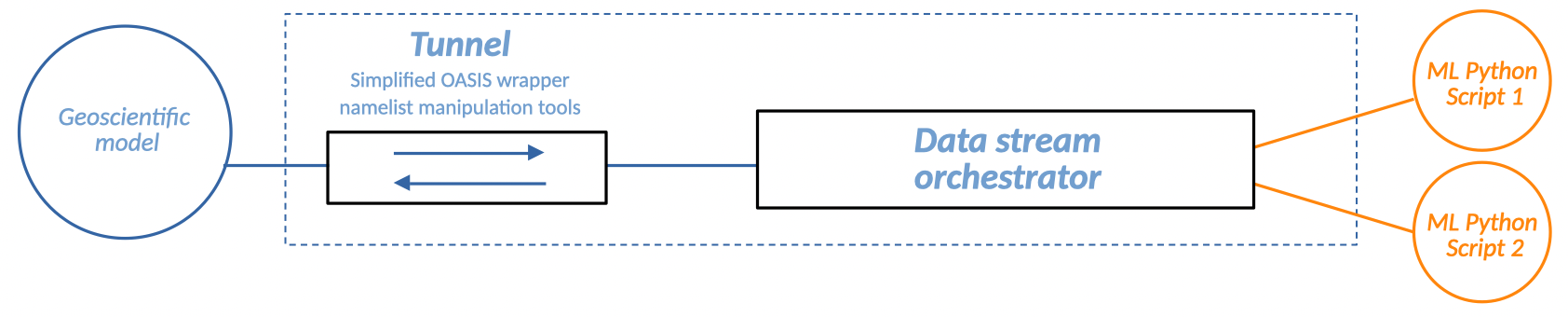
Note
Tunnel may be summarized with the following thought: I want to open a gate between my codes to exchange these fields, N times, on this grid.
Grid
The fields that are sent or received by each coupled script are usually scattered among their executing processes. OASIS needs to know the local grid sizes expressed with global indexes to perform optimized partition-to-partition communications. If global sizes are different, OASIS can also perform interpolation from a grid to another.
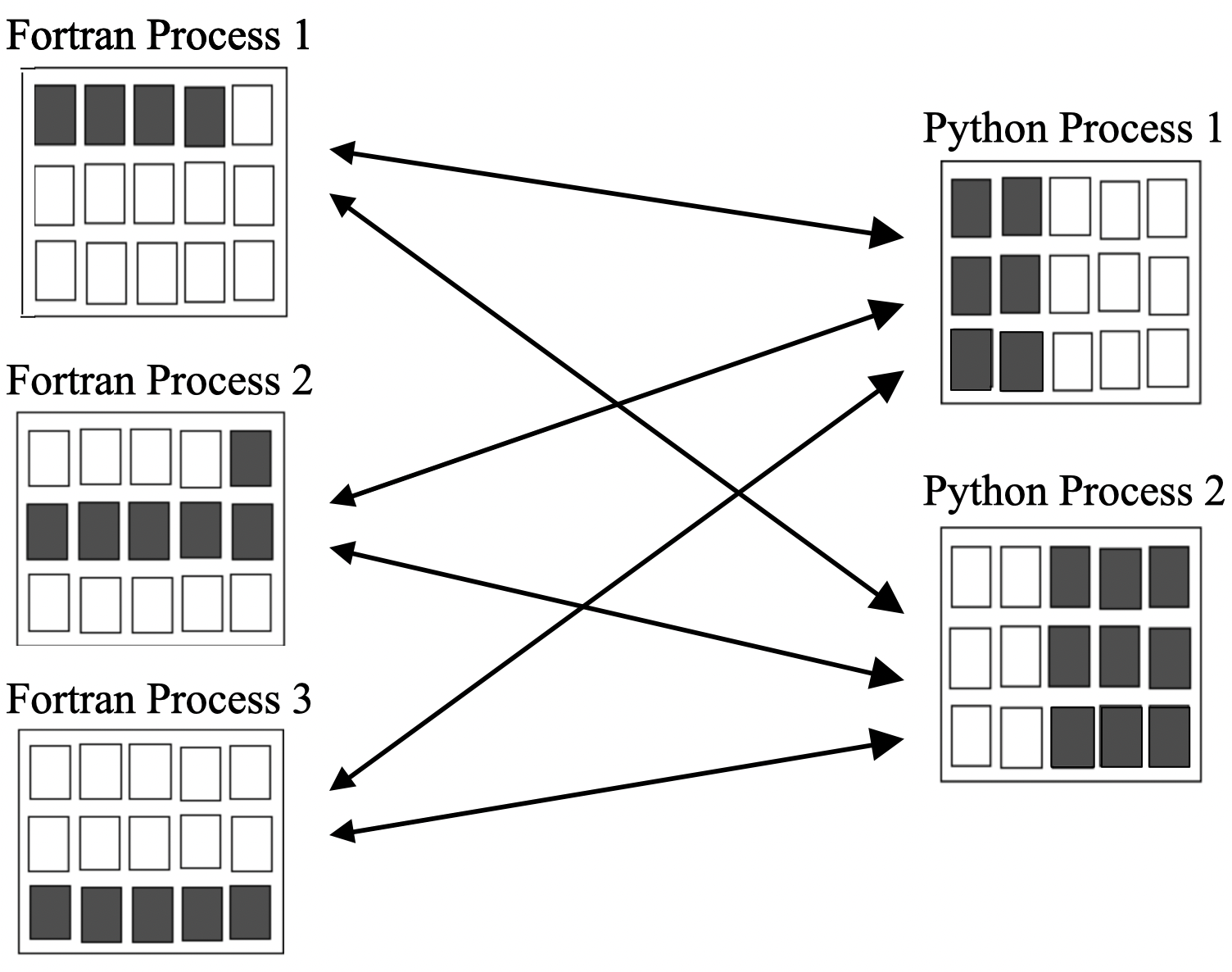
In the Eophis framework, it is considered that the coupled grids are identical on both side. Defining the local partition is still required anyway to set up communications. This operation is done by the Grid object. Global 2D longitude and latitude sizes are the minimal required attributes to create a Grid. Third dimension for depth is specified in Tunnel since OASIS considers that sending a 3D field is like communicating N-level times on the same 2D partition.
Halos
For some operations, such as differential calculus or in Convolutional Neural Networks, it is necessary to know the neighboring cells of the local grid being processed. When local grids are located at the edges of global grid, boundary conditions must be specified to determine the values of cells that cross the boundary. This requirement remains true even if global grid is not distributed across multiple processes.
- Thus, grid cells may be divided into two parts:
real cells: cells strictly contained in the local grid (yellow)
halo cells: potential extra cells outside the local grid containing neighboring values (blue)
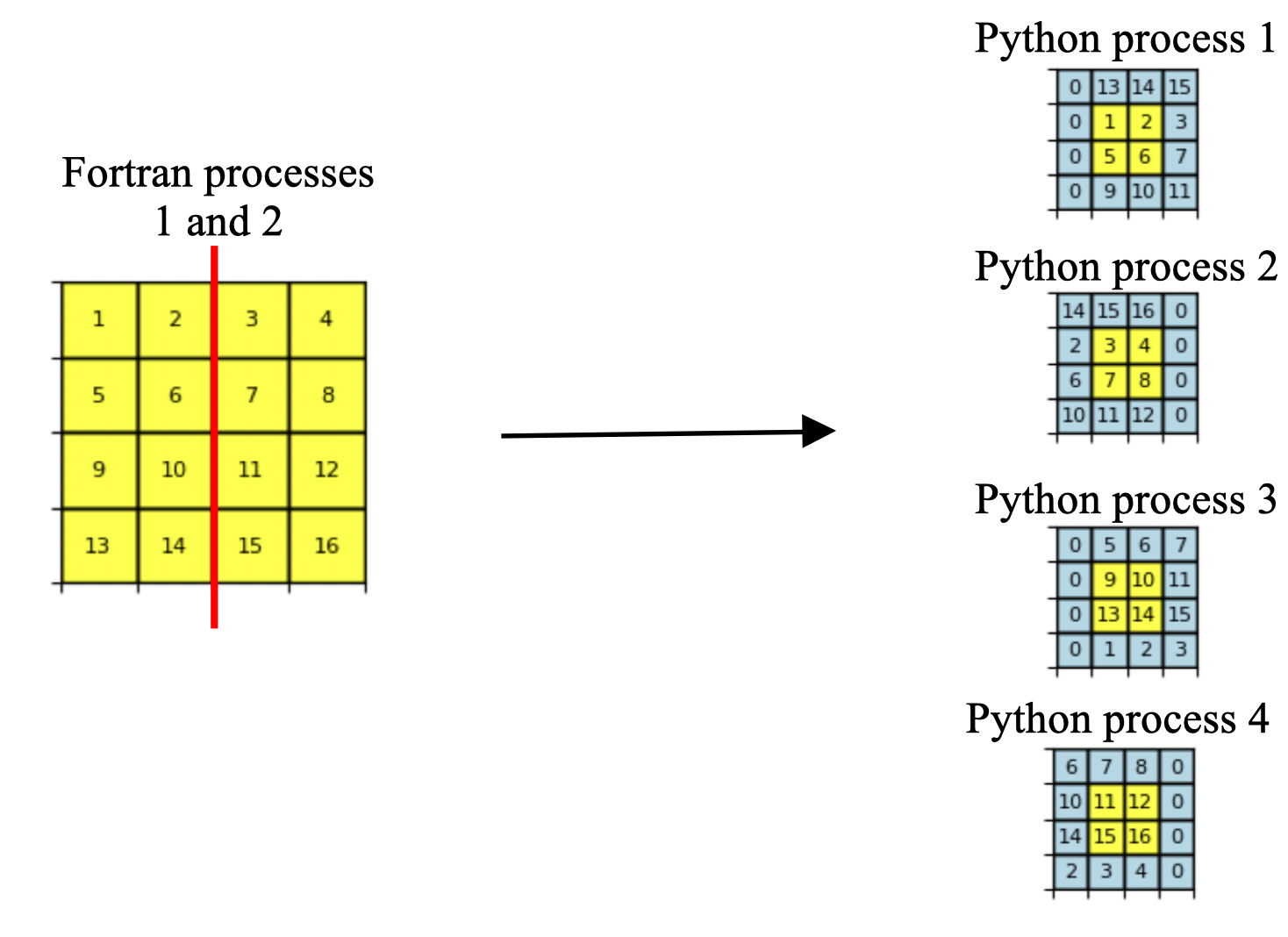
In classic OASIS coupling, communications only involve real cells, as coupled geoscientific models possess their own internal communication system to construct halos. With some tricks and intermediate reconstruction operations, Grid can obtain fields with extra halos cells directly from OASIS communications. This spares the need to create an internal communication system for Eophis, killing two birds with one stone by combining halo construction with field exchanges. When sending a field back, Grid automatically removes the halo cells.
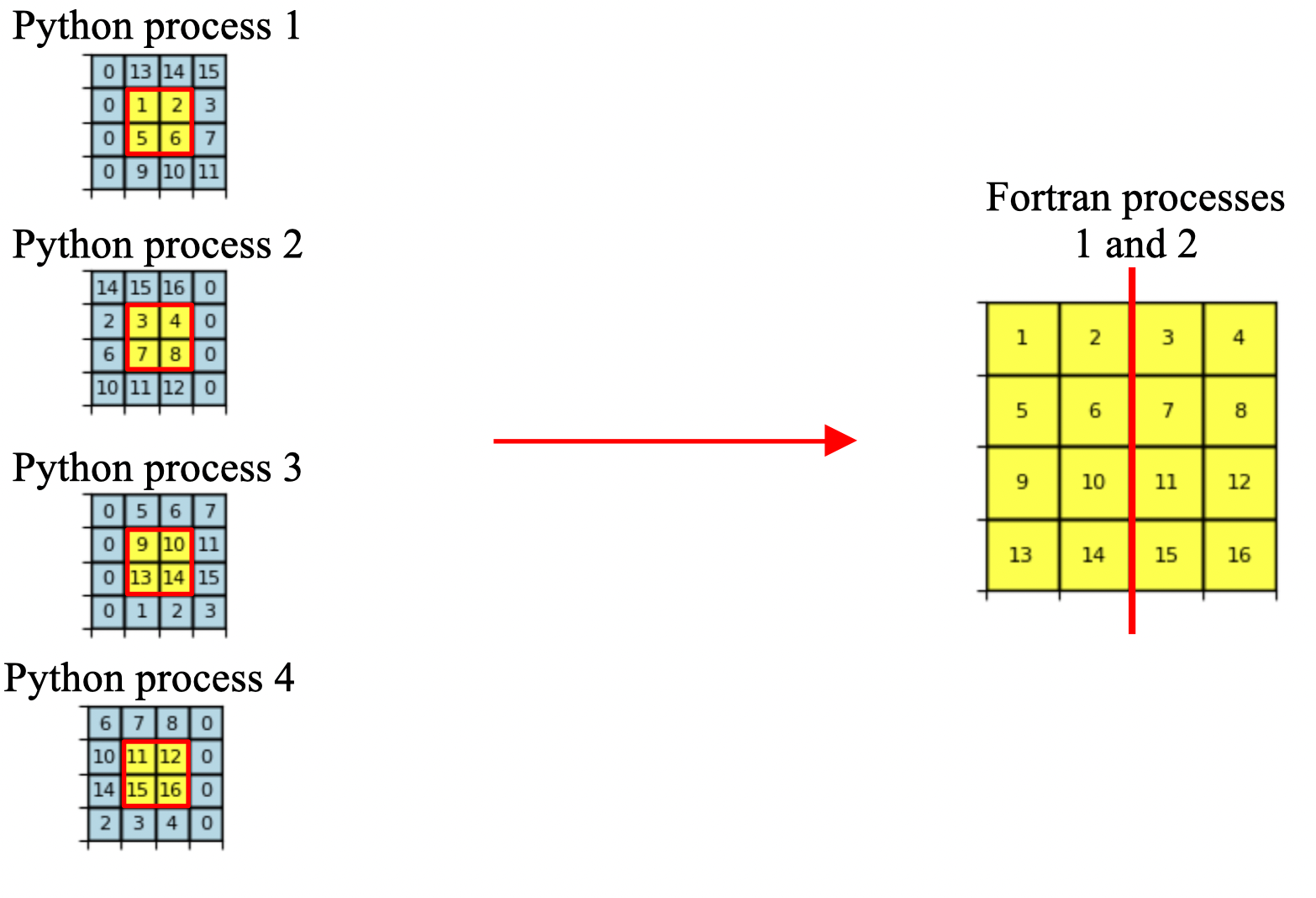
Grid definition can include an additionnal halo size attribute. A zero halo size corresponds to classic OASIS communications. Boundary conditions can also be specified during Grid definition to determine the value of halo cells that cross the global grid edges.
- Three types of boundary conditions are available:
close: halos cells are filled with zeros (horizontal dimension in above examples)
cyclic: halos cells are filled with periodic values (vertical dimension in above examples)
NFold: vertical dimension top line is folded on itself, see section 7.2 of this documentation
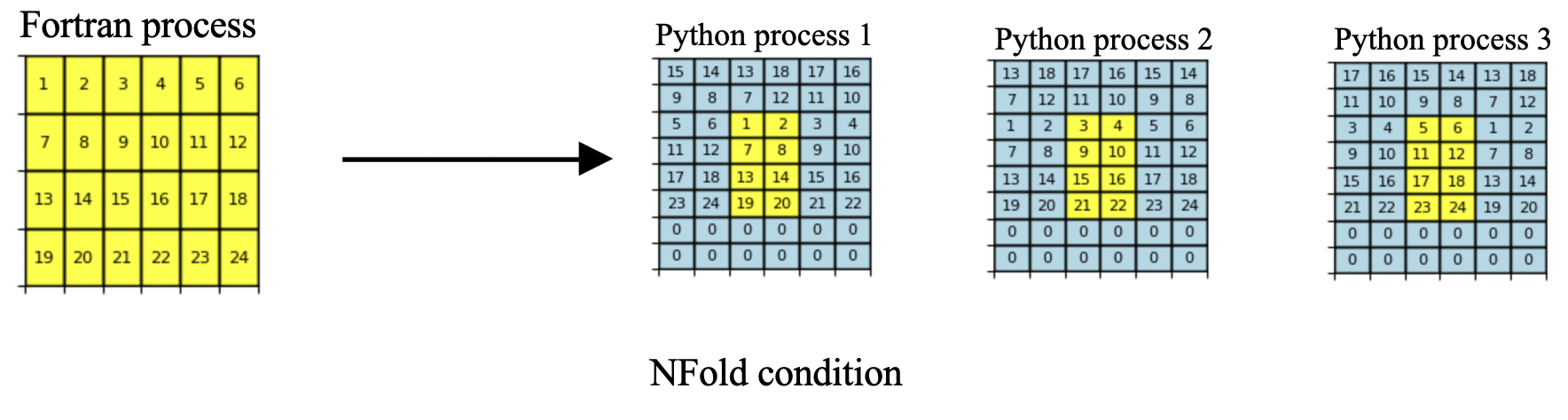
If not specified, default halo size and boundary conditions are zero and close. Note that boundary conditions are useless if Grid is defined without halos.
Warning
NFold (NorthFold) imposes close condition for second dimension bottom line. It is used by NEMO on three-polar ORCA grids to model global ocean circulation. NFold condition requires to specify folding point (T or F) and grid point type (T,U,V or F).
Note
Pre-defined commonly used grids with/out halos are stored in Eophis sources. A pre-defined Grid is referred to as Domains in Eophis.
Model
Model refers to the functions in the Python script towards which the exchanged fields should be sent or obtained.
- A Model must fit the following requisites:
be a callable function that takes at least N numpy arrays as inputs (those are the data received from the Tunnel).
return M
Nonefor the M awaited outputs if at least one of the N inputs isNone.inputs may be freely formatted and transformed, but outputs must be formatted as numpy arrays whose dimensions correspond to those awaited by the Tunnel grid.
Loop
In its standard use, OASIS needs to be aware of the temporal advancement of both coupled scripts to synchronize exchanges in time. In the context of coupling a Python script to use functions (like ML models), time is not computed. Thus, it is needed to mirror the temporal advancement of the coupled geoscientific code to keep synchronicity of exchanges.
Loop is an object that emulates time advancement with a hidden time stepping procedure. It only needs to know the total simulation time and to be associated with a Tunnel.
When Loop starts, all receptions and sendings of the associated Tunnel are temporally orchestrated.
Warning
Time loop won’t start if all the Static exchanges (see Frequency section) of the associated Tunnel are not performed.
Frequency
Depending on the setup, fields can be exchanged once or repeatedly as the Loop emulates time advancement. Different communication frequencies can be configured for each field.
- Two types of frequency are available:
Static: sending or receiving a field is done manually ONCE and will be ignored by the Loop. This is useful to obtain non-evolving data as masks or metrics.
Non-static: fields will be exchanged at the prescribed frequency (expressed in seconds). Manual sending or receiving are disabled for those fields.
Note
Static frequency is a pre-defined Eophis parameter. Pre-defined regular frequencies are also available.
Router
The coupling is now set up with the Tunnel and the exchanges are automated by the Loop. Received fields need to be sent towards the desired Model inputs, and returned fields need to be pushed in the correct Tunnel for sending back. This pipeline is intended to change with the user wanted realization.
Router is a tool whose role is to offer simplicity and flexibility for setting up connexions between the exchanged data and the inputs / outputs of the Models.

Miscellaneous
Above objects are enough to build a basic coupling workflow. Extra useful tools are yet available in the Eophis libary and are presented below.
Namelists
Geoscientific Fortran / C codes often use namelists to configure the physical context of the simulation. Important informations as time step are stored within.
User is free to hard code the physical context in the Python script. Nevertheless, it is more robust to obtain these informations where the coupled physical code does.
Thus, a tool to read formatted namelist and access its content is available in Eophis. It also allows to modify the namelist items and write the updated version.
Note
OASIS namelist namcouple is a particular case. Only one OASIS namelist is required for all couplings, and needs to be correctly written to avoid errors hard to track. Every action related to Tunnel configuration is supervised by namcouple. For all these reasons, object Namcouple is a protected unique entity with its own API.
It is possible to bring its own namcouple and use Eophis to check its content in accordance with the desired coupling context.
Logs
Two log files eophis.out and eophis.err for regular and warning/error messages are automatically created and filled when importing Eophis package. The API to use them is accessible to the user.
- Logs allow three message types:
Info: regular outputs in
eophis.outWarning: described in
eophis.err. Indicates ineophis.outthat a warning occuredAbort: Proceed as warning messages, then kill the execution